
It's the 28th of the month. The school accountant has a biometric printout on one side of the desk, the leave register on the other, and an Excel sheet open that someone built in 2017 and nobody fully understands anymore.
By the 1st, every teacher, driver, peon, guard and ayah has to be paid. Correctly.
Then, on the 2nd, a science teacher knocks on the accounts office door. ₹2,000 has been cut from her salary for two days marked absent. One of those days was an approved casual leave. The approval just never made it from the principal's office to accounts.
If this sounds familiar, you're not alone. In many Indian schools, payroll is the most stressful week of the month, and it's almost entirely invisible to everyone except the people doing it.
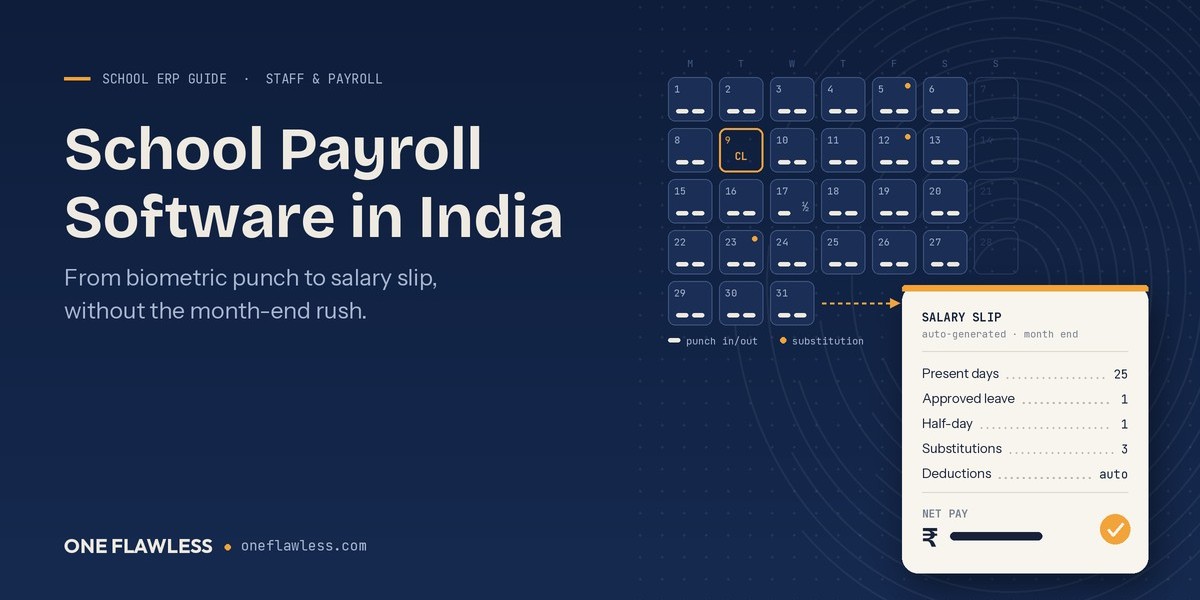
School payroll software fixes this by connecting the pieces that are currently passed around by hand: attendance, leave, salary structure, deductions and salary slips. This guide explains why school payroll is harder than it looks, what good software should actually do, and how to switch without risking a single wrong salary.
Why School Payroll Is Harder Than It Looks
From the outside, payroll seems simple. Fixed salary, minus leave, done. Anyone who has run it in a school knows otherwise.
A school employs a far more mixed workforce than most offices of the same size:
Permanent teachers on fixed pay scales with yearly increments
Contract and probation staff on different terms
Part-time coaches for music, dance or sports, often paid per period
Drivers, conductors and helpers whose hours depend on bus routes
Ayahs, peons, gardeners and guards, some on the rolls and some through an agency
Hostel wardens and mess staff in boarding schools
Each group may follow different rules. Then come the school-specific situations. A teacher takes a substitution period and gets paid extra. A staff member arrives late three times, and your policy counts that as a half-day. Summer vacation follows its own leave logic. A delayed increment needs arrears.
Even something as basic as a day's pay causes arguments. Does your school divide monthly salary by 30, by 26, or by the actual working days in that month? Each method gives a different number, and if the rule lives only in the accountant's head, every salary dispute becomes a debate.
That's why payroll deserves a proper look whenever you compare school management software in India. It's the one module that touches every single employee, every single month.
What Month-End Looks Like Without Software
Here's a typical salary cycle in a school running on registers and spreadsheets:
The biometric machine's report is exported or printed.
Someone matches it, line by line, against the manual leave register.
Late arrivals and half-days are marked by hand.
Substitution and extra-duty records are collected from the timetable in-charge.
Everything is typed into the salary Excel sheet.
Deductions are checked, and the sheet is sent to the principal for approval.
Salary slips are printed or typed one by one.
The final figures are re-entered into the accounting software.
That's eight hand-offs, and each one is a chance for an error. None of them feel like a big job on their own, which is exactly why schools tolerate them for years.
If your school still runs most of its admin this way, our comparison of school ERP vs Excel shows where spreadsheets start costing more than they save.
What Good School Payroll Software Should Actually Do
Good payroll software isn't just a salary calculator. It's a chain, and each link should feed the next one without anyone retyping anything.
1. Pull attendance straight from the device
Staff punch in on a biometric device or an RFID reader, and that data should land directly in each employee's attendance record. Late arrivals and early exits get flagged automatically under your school's own rules.
Not sure which device suits your school? Our guide to RFID vs biometric vs face recognition compares them honestly. And if you already use RFID cards for students, the same RFID school management system can also send bus boarding alerts to parents, so the hardware earns its keep in more than one place.
2. Handle leave the way your school does
Casual, medical, earned and duty leave should each have their own balance. When a staff member applies and the principal approves, the record should update on its own, so the "approved but never reached accounts" problem simply disappears.
3. Store salary structures, not just salary amounts
Basic pay, allowances, increments and deductions should be set once per employee or grade. Then the monthly run uses the structure instead of someone recalculating it.
4. Account for school-specific extras
Substitution periods, extra duties, per-period pay for part-time coaches, and arrears should all be handled inside the system. Substitutions are especially easy to lose track of. Our post on timetables and substitutions shows how that record gets created in the first place.
5. Deal with statutory deductions properly
Depending on your staff strength and state, you may need to handle PF, ESI, TDS and professional tax. Ask any vendor exactly which of these their system calculates. Then have your CA check one month's output before you rely on it.
6. Produce salary slips staff can actually see
Each employee should be able to view their slip and leave balance on their phone through the school's mobile app, instead of queuing at the accounts window. The same app should serve parents and teachers too. If you're still comparing options, our guide to the Best School Mobile App in India explains what to look for.
7. Feed the accounts and the reports
Salary totals should flow into your financial accounting without being typed in again. Management should be able to see payroll cost by department, grade or branch whenever they need it.
A Payroll Month: Before and After
With registers and Excel, the month goes something like this. Someone prints the biometric report and matches it by hand. The paper leave register gets checked, and missing approvals get chased. Late marks and half-days are counted manually, and often argued over. Substitution records are collected from the timetable in-charge. Salaries are worked out in a formula-heavy sheet, slips are printed one by one, and the totals are typed again into the accounting software. When a staff member has a question, the answer is usually "let me check and get back to you."
With school payroll software, the same month looks very different. Device data reaches each attendance record on its own. Approved leave is already deducted from the right balance. Late marks follow the school's set rule, the same way for everyone. Substitution pay comes straight from the substitution record. Salaries are generated from saved structures, slips appear on each staff member's app, and the totals flow into financial accounting. When someone has a question, they can open their own breakdown and see the answer.
Even if each step saves only a few minutes per employee, those minutes add up quickly in a school with 60 or 80 staff. Our school ERP ROI guide helps you put a number on that for your own school.
Staff Management Is More Than Payroll
Payroll works best when it sits inside proper staff management software for schools, not as a separate tool. That's because salary is only one part of an employee's record. A complete staff module should also hold:
Recruitment records, such as applications, interviews and joining documents
Employee profiles with qualifications, experience, bank details, ID proofs and contract terms
Staff services like leave requests, certificates and internal requests
Yearly appraisals, ideally supported by real inputs like classroom observations and inspections
Personal dashboards, so each staff member sees their own attendance, leave and timetable
When all of this sits in one place, the principal can see the whole picture at once: who is on leave, who is overloaded with substitutions, and where payroll costs are rising. Our post on dashboards for principals shows what that daily view can look like. And for a teacher's side of the story, see what changes in a teacher's day.
Teachers' work doesn't stop at attendance and salary, either. If your school runs digital classes, homework and lesson plans online, it helps when those sit on the same platform as staff records. Our practical guide to School ERP & LMS Software explains how the two fit together.
Why Your Staff Will Care More Than You Expect
Here's something schools often overlook. Payroll software isn't only an accounting tool. It's a trust tool.
Staff rarely leave a school because of one salary mistake. But repeated small errors, unexplained deductions and the feeling of having to "prove" an approved leave slowly wear down goodwill in the staff room.
When the rules are applied the same way to everyone, and each person can see their own attendance, leave and salary breakdown, most disputes never start. Your accountant stops being the person everyone argues with on the 2nd of the month.
Protect Salary Data Like Student Data
Payroll records include bank accounts, PAN, Aadhaar and salary details. That's some of the most sensitive information your school holds about its people.
Make sure your software offers role-based access, so the payroll clerk sees salaries, a class teacher doesn't, and the principal sees summaries. Ask where the data is stored and how it's backed up. Our guide to the DPDP Act and school data focuses on students, but the same principles apply to staff records.
Eight Questions to Ask in a Payroll Demo
Don't settle for a general product tour. Bring last month's salary sheet and ask the vendor to show you:
How does a biometric punch reach the salary calculation? Show it live.
Can you set our exact late-coming and half-day rules?
How are different leave types and balances handled?
Can you calculate per-period pay for part-time coaches?
Where do substitution periods come from, and how do they affect pay?
Which statutory deductions does the system handle, and which would we still do outside it?
What does a salary slip look like on the staff app?
Do salary totals flow into our accounts automatically?
For the wider evaluation, including pricing, support and other modules, use our guide on how to choose the Best School ERP Software in India.
Rolling It Out Without a Single Wrong Salary
Payroll is the one area where you shouldn't experiment in front of your staff. A careful rollout looks like this:
Clean the staff master first. Make sure every employee has a correct profile, bank details, joining date and grade.
Set up salary structures and leave rules, and get them signed off by management before go-live.
Import opening leave balances as of the start date, so nobody loses or gains leave overnight.
Run one month in parallel. Process payroll the old way and in the new system, then compare the results line by line. Fix any differences before you switch.
Choose a calm month to go live. Avoid March and April, when exams and admissions keep the office busiest.
Tell your staff what's changing. Show them how to check their slip and leave on the app. Fewer surprises mean fewer complaints.
Our step-by-step ERP implementation guide covers the wider rollout. If you're moving from another ERP, read how to switch without losing data.
How One Flawless Handles Staff and Payroll
In One Flawless, staff and payroll aren't add-ons. They're part of the same School ERP Software that runs your admissions, fees and exams.
Here's what that covers on the staff side:
Staff Management, covering recruitment, appraisal and staff services
Attendance and Leave Management, with biometric and RFID integration for staff attendance
Finance Management, with payroll and financial accounting alongside fee collection
A Staff Dashboard, giving each employee their own view of their records
A mobile app on Android and iOS, so staff can check updates from their phones
Because attendance comes straight from your biometric devices, the data that drives salary calculation is accurate and current, rather than retyped at month-end. That means less checking for your accounts team and fewer disputes for your principal.
It also means your staff records sit right next to your student records. The same platform works as your Student Management Software in India, so a teacher's profile, classes, timetable and salary all live in one system instead of five.
Running several schools? Payroll across branches is covered in our post on Education ERP Software for trusts running multiple schools. Wondering about the budget? Our honest guide to school ERP costs in India explains what affects the price.
Frequently Asked Questions
What is school payroll software?
It's software that calculates staff salaries using attendance, leave and salary structures, then generates salary slips and payroll reports. In a school ERP, it shares data with staff records, attendance and accounts.
Can it work with our existing biometric machine?
In many cases, yes, depending on the device model. Share your device details with the vendor and ask them to confirm compatibility before you sign.
Does it handle part-time and contract staff?
It should. Ask to see a per-period or contract salary set up live during the demo.
Is payroll software worth it for a small school?
If your accountant spends several days every month on salaries, usually yes. Small schools can start with only staff attendance and payroll. See what small schools actually need.
Can staff see their salary slips themselves?
With One Flawless, staff get access through the mobile app and their own dashboard, so they don't need to visit the accounts office for every query.
Make the 1st of the Month Boring Again
Salary day shouldn't be the most stressful week in your school's calendar. When attendance, leave and salary work from the same record, payroll becomes a routine check instead of a three-day project, and your staff get paid correctly with a clear breakdown every time.
Here's an easy way to see the difference. Book a free demo and bring last month's salary sheet, the one that took the longest to finish. We'll show you how the same month would run in One Flawless, from biometric punch to salary slip. Book your free One Flawless demo