
Ask five principals whether their school has "gone digital," and you'll get five different answers.
One will point to the smart boards in every classroom. Another will mention online fee payment. A third will say the teachers now share homework on WhatsApp. The fourth has an ERP that only the accounts team really uses. The fifth will laugh and say, "We're still on registers, but we're planning."
All five are partly right. And that's the problem.
Digital transformation in schools isn't about how many gadgets or apps you've bought. It's about how information moves through your school: from the admission desk to the classroom, from the classroom to the parent, and from every department to the principal's table. A school with three apps that don't talk to each other can be less "transformed" than a school with one simple system everyone actually uses.
This guide gives you a practical way to look at it. We'll walk through four stages most Indian schools pass through, help you figure out which one you're in, and show you the single most useful next step from where you stand.
What Digital Transformation Actually Means for a School
Strip away the buzzwords, and digital transformation in a school touches three areas.
The first is administration: admissions, student records, attendance, fees, exams, staff and transport. This is where most of the paperwork lives, and where most of the time goes.
The second is communication: how notices, attendance alerts, fee reminders and results reach parents, and how parents reach you back.
The third is learning: lesson plans, homework, study material and, in some schools, live classes.
A smart board improves one classroom. A connected system improves how the whole school runs. Both matter, but only the second changes what your office staff, teachers and parents experience every single day.
Why This Can't Wait Much Longer
Parents now pay their electricity bill, book train tickets and order groceries from their phones in under a minute. Then they're asked to stand in a fee queue or wait for a printed circular that may or may not make it out of a school bag. The gap is noticeable, and parents do notice it.
At the same time, the paperwork expected of schools keeps growing. Government reporting such as UDISE+ and RTE records needs clean, consistent data, which is hard to produce from scattered registers. (We've covered this in our post on keeping UDISE+ and RTE records ready.) The National Education Policy 2020 also puts real weight on using technology in teaching as well as in planning and administration.
None of this means you need to change everything at once. It just means standing still is getting more expensive every year.
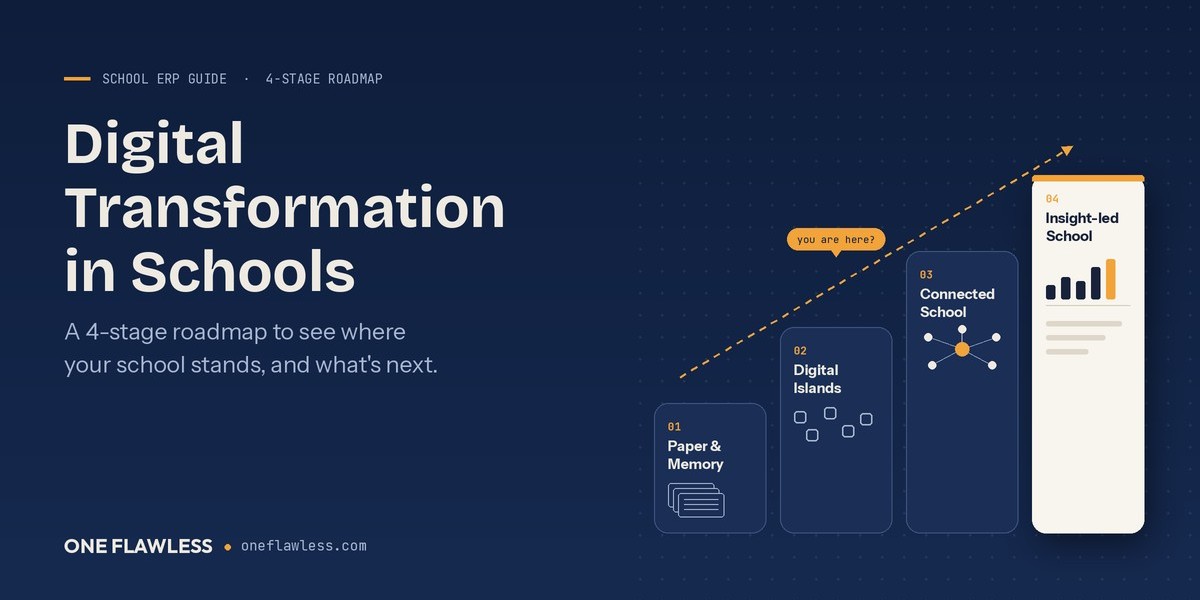
The Four Stages of Digital Transformation in Schools
Most schools don't jump from paper to a fully connected campus overnight. They move through stages, often without realising it. Here's what each stage looks like, how to recognise it, and what to do next.
Stage 1: Paper and Memory
This is where many schools still are, especially smaller ones and those in tier-2 and tier-3 towns. Admissions are recorded on forms and in a big register. Attendance is marked in a class register. Fees are collected at a counter with handwritten or printed receipts. Results are calculated by hand or on a basic sheet.
The real system here isn't paper. It's a memory. The school runs because a few experienced people know where everything is. The office head knows which family has pending fees. The senior teacher knows which student was absent last week. When those people are on leave, things slow down.
You're likely in Stage 1 if finding an old student's record means opening a cupboard, a TC takes a day to prepare, or month-end reports depend on one person staying late.
Your next step is to move the most repetitive work first: student records, attendance and fee receipts. Our comparison of manual registers vs school management software shows what that switch looks like in practice.
Stage 2: Digital Islands
This is the most common stage today, and the most deceptive one. The school is clearly using technology: Excel for marks, a separate fee app, a biometric machine with its own software, WhatsApp groups for every class, maybe Tally for accounts.
Each tool works fine on its own. But they're islands. Information crosses from one to another only when someone retypes it. A parent's new phone number gets updated in one place and stays old in four others. The principal asks for a simple report, and someone spends an afternoon merging three files.
You're likely in Stage 2 if your staff say "let me check the other sheet" a lot, if you're paying for several small tools, or if the WhatsApp groups have become the school's real notice board.
Your next step is not to add another app. It's to connect what you have, or replace it with one platform. If spreadsheets are your main island, read school ERP vs Excel. If WhatsApp groups are the main channel, our post on school apps vs WhatsApp groups explains why they stop working as a school grows.
Stage 3: The Connected School
This is where things start to feel different. The school runs on a single platform where every department works from the same student record. The admission desk creates a profile once. Fees, attendance, exams, transport and the parent app all use that same profile.
A proper School Management Software setup at this stage means a teacher marks attendance and the parent is informed the same morning. A parent pays a fee on the app, and the receipt, ledger and pending-dues list all update together. Results are generated from marks entered once, not merged by hand.
The student record sits at the centre of all of this. Good Student Management Software in India keeps everything from the admission form to the TC in one place, so nobody has to rebuild a child's history from scattered files.
Physical campus operations join in too. An RFID School Management System can tell parents when their child boards the school bus, and biometric devices can feed staff attendance straight into records. (If you're choosing between the two, compare RFID vs biometric vs face recognition.)
And for parents, all of this shows up in one place: their phone. When you're comparing options, our guide to the Best School Mobile App in India explains what actually matters to families.
You're likely in Stage 3 if a new admission automatically appears in the class list, the fee ledger and the bus list without anyone retyping it.
Your next step is to start using the data you're now collecting, which brings us to Stage 4.
Stage 4: The Insight-Led School
Here, the school doesn't just record information. It uses it.
The principal opens a dashboard in the morning and sees attendance, pending fees and upcoming exams at a glance. The academic coordinator spots that Class 7 maths scores dipped this term and plans extra support before the finals. Management notices that one bus route keeps running late and fixes it before parents complain.
Learning connects with administration at this stage too. Homework, lesson plans and study material sit alongside attendance and marks, so teachers see the full picture of each student. Our practical guide to School ERP & LMS Software shows how the two fit together.
For school groups, Stage 4 also means comparing branches side by side instead of waiting for each campus to send its own report. That's where Education ERP Software built for trusts and multi-school groups comes in.
You're in Stage 4 when decisions start with "let's check the dashboard" instead of "let's ask the office."
For a closer look at what this daily view can include, see our post on dashboards and reports for principals.
A Two-Minute Self-Check
Answer these eight questions honestly. Count how many times you say "yes."
Is every student's record kept in one system, not across registers and files?
Can parents pay fees online and get an instant receipt?
Do parents get absence alerts the same day?
Are marks entered once, with report cards generated automatically?
When a new student joins, do they appear in fees, attendance and transport without retyping?
Do teachers share homework through a school app rather than personal WhatsApp?
Can the principal see today's attendance and pending fees without asking anyone?
Do you use reports to make decisions, not just to file them?
If you scored 0 to 2, you're likely in Stage 1. A score of 3 to 4 usually means Stage 2. Five to six points to Stage 3, and seven or eight means you're already working like a Stage 4 school.
Whatever your score, the goal isn't to rush to the end. It's to make the next move cleanly.
The Part Nobody Plans For: People
Software is the easy part. People are where digital transformation actually succeeds or fails.
Teachers worry it'll mean more work, not less. That worry is fair if the system is clunky or if training is a single long session nobody remembers. The fix is simple: show each teacher how their own day gets lighter. Attendance in a minute, homework posted from the phone, no merging marks at midnight. We've written about what changes in a teacher's day in detail.
Office staff often feel their experience is being replaced. In reality, their knowledge is exactly what's needed to set the system up correctly. Involve them early, and they'll become your strongest supporters.
Parents vary widely. Some will download the app on day one. Others, especially grandparents who handle school pick-ups, may need a short demo at the next PTM. Plan for both.
And management needs patience. The first month always feels slower. By the third month, most schools wouldn't go back.
Common Worries, Answered Honestly
"Our internet isn't reliable." Fair concern. A cloud system still works well on mobile data, and staff can often catch up on entries once the connection returns. Our post on what "cloud" should really mean covers what to ask vendors about this.
"It will cost too much." Costs vary widely depending on school size and modules. Our honest pricing guide breaks it down, and our look at free vs paid software explains why "free" often isn't.
"What about student data privacy?" Rightly a big question under the DPDP Act. Read what your school software must protect before you choose any platform.
"We're a small school. Is this really for us?" Yes, if you start small. See what schools under 500 students actually need.
A Simple 90-Day Starting Plan
You don't need a five-year plan to begin. Ninety days is enough to move up one stage.
In the first month, list every register, sheet and app you currently use. Clean your student data: remove duplicates, link siblings and update old phone numbers. Decide which three problems hurt the most.
In the second month, go live with the core: student records, attendance, fees and parent communication. Train staff role by role, in short sessions.
In the third month, review what's working. Retire the old registers and tools you've replaced. Then add the next layer, such as exams, timetable or transport.
For a fuller rollout plan, our step-by-step implementation guide walks through every phase. If you're replacing an existing system, read how to switch your school ERP without losing data.
Where One Flawless Fits In
One Flawless is built to take schools from Stage 1 or Stage 2 all the way to Stage 4, at a pace that suits them. As a complete School Management Software in India, it brings more than 40 modules together across ten groups: reception, students, staff, attendance, finance, examinations, academics, communication, administration and dashboards.
That covers admissions and visitor records, student services and alumni, staff recruitment and payroll, fees and financial accounting, exams and results, lesson planning, timetables, the library and live classes, along with SMS, email and WhatsApp communication, transport, hostel, canteen and inventory.
It connects with the hardware and services you may already use: biometric devices, RFID, GPS tracking, online payments, POS and barcode systems, and your school website. Parents, teachers, students and management all get the One Flawless mobile app on Android and iOS.
Today, the platform supports 100+ schools across 10+ locations, and you can start with just the modules you need.
Frequently Asked Questions
What is digital transformation in schools?
It's the shift from paper-based and disconnected processes to connected digital systems for administration, communication and learning. The aim is to make information flow smoothly between departments, teachers and parents.
Is buying smart boards the same as digital transformation?
No. Smart boards improve classroom teaching, which is valuable. But digital transformation also covers how the school runs: records, fees, attendance, communication and reporting.
How long does it take?
Most schools can move up one stage in about three months if they start with the core modules and train staff well. Moving through all four stages usually takes longer and works best in phases.
Where should a school start?
Start with the work that's most repetitive and causes the most complaints. For most schools, that's student records, attendance, fee collection and parent communication.
Can we keep using some of our existing tools?
Often, yes. Hardware like biometric and RFID devices can usually be connected. Separate apps doing the same job as your new platform are better retired, so data stays in one place.
Find Your Stage, Then Take One Step
Digital transformation in schools isn't a single big purchase or a dramatic overnight change. It's a series of clear steps, from paper to digital, from digital to connected, and from connected to insight-led.
The schools that get there fastest aren't the ones with the biggest budgets. They're the ones that know exactly where they stand and fix one stage at a time.
Here's an easy way to begin. Take the self-check above, note your score, and book a free demo with One Flawless. Tell us your stage, and we'll show you exactly what your next step looks like, using your school's own workflows. Book your free One Flawless demo