
It's 7:40 on a Monday. A Class 6 girl taps her ID card at the school gate. By the time she has climbed the stairs to her classroom, her mother already knows she has reached.
Across town, the transport in-charge isn't on the phone. He's looking at a map with three buses moving on it. Meanwhile, in the accounts room, last night's fee payments are already matched to receipts.
Nobody has opened a register yet.
That's a normal morning in a school that runs on connected software. And honestly, it's a lot calmer than most people expect.
Most blogs about school ERP start with a long list of modules. We're going to do something different. We'll follow one school day, hour by hour, and see what changes for the people who actually run it. That means the guard at the gate, the bus coordinator, the class teacher, the front desk, the accountant, the parent and the principal.
If you own or run a school and you're tired of registers and spreadsheets, this will help you picture what school ERP software really does. You'll also see where it saves time and what to check before you sign up for one.
Why One Connected Day Beats a Long Feature List
India has a huge school system. According to UDISE+ 2024-25 data from the Ministry of Education, the country has about 14.7 lakh schools, nearly 24.7 crore students and over one crore teachers. Every one of those students creates records every single day. Attendance, fees, homework, bus details, marks, health notes and messages home all add up.
In a lot of schools, those records still sit in different places. Attendance goes in a register. Fees go into a separate accounting tool. Bus routes live in the transport head's notebook. And parent updates get lost somewhere in a dozen WhatsApp groups.
Each of these works fine on its own. The problem shows up when they need to connect. For example, a child is absent and nobody calls home. Or a parent with pending fees gets an admit card anyway. Or the principal asks, "How much did we collect today?" and three people have to check three different files.
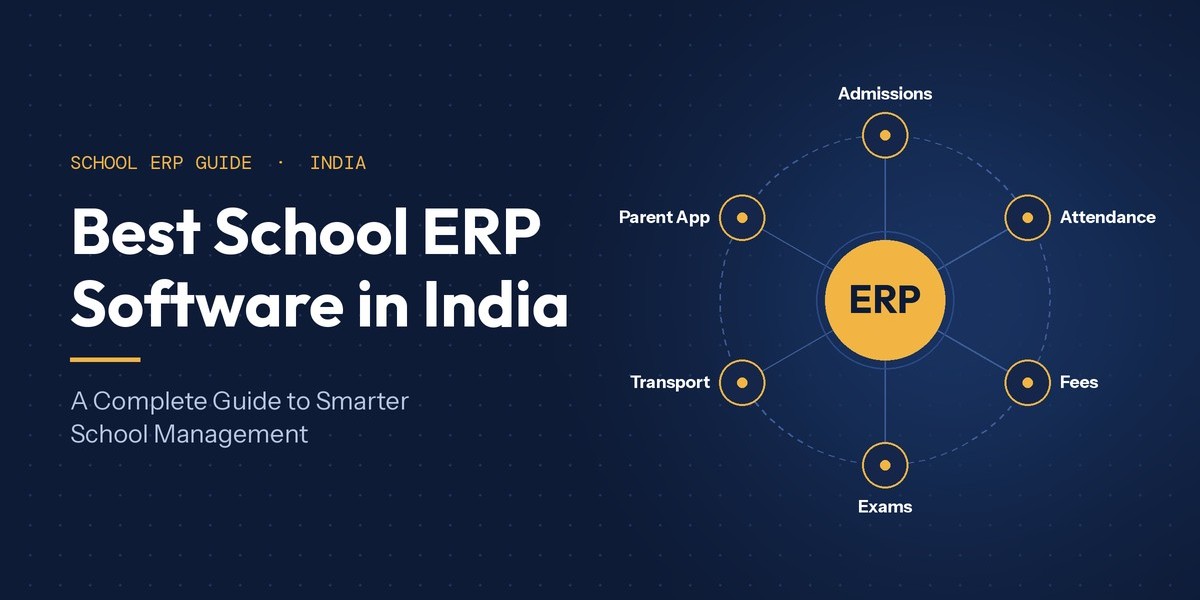
Basic school management software fixes some of this by putting single tasks online. An ERP goes further. It puts every department on one shared system, so you enter something once and it shows up wherever it's needed.
That difference is easiest to see when you walk through a real day. So let's start at the gate.
7:30 AM: The Gate and Morning Attendance
Mornings are where paper hurts the most. First, a teacher calls out 40 names. Then the register gets updated. After that, at the end of the month, someone types it all into a spreadsheet. That's three handovers and three chances for a mistake.
How an RFID School Management System Works
An RFID school management system takes roll calls out of the classroom. Every student and staff member gets an ID card with a small radio tag inside. When they tap it on a reader at the gate, the system notes the time and marks attendance on its own. Nobody types a thing.
Because attendance is captured right at the gate, the system can act on it straight away. At One Flawless, RFID cards handle student attendance, staff attendance and bus entry, and parents get an alert when the card is read. Some schools prefer fingerprints instead. That's fine too, since biometric attendance plugs into the same module.
Still not sure which hardware suits you? Our guide on RFID vs biometric vs face recognition attendance explains the trade-offs. And if you want actual numbers, the RFID attendance cost and setup guide covers cards, readers and installation.
What Parents Actually See
Parents get two simple things. The first is a message that their child has reached school. The second, if the child hasn't arrived, is an absentee alert before the first period ends.
That second message matters more than you'd think. Without it, a parent finds out about a missed day at 3 PM, or worse, at the next PTM. With it, they know within minutes and can do something about it.
8:00 AM: School Buses Without Endless Phone Calls
Ask any transport coordinator about their mornings. They'll tell you it's mostly phone calls. "Has the bus left?" "Why is it late?" "Did my son get on?"
GPS school bus tracking answers those questions before anyone dials. Every bus shows up on a live map. Routes and stops are set up in the transport module. Parents get location alerts, so they know exactly when to walk to the stop. And if there are RFID readers on the buses too, the school knows who actually boarded, not just where the bus is.
So what does the coordinator get out of all this? Time. Instead of answering forty calls, they can deal with what really needs attention. A breakdown. A route change on a rainy morning. A child who didn't get on.
9:00 AM: Teachers Get to Teach
Once classes start, software should stay out of the teacher's way. Good systems do this by taking care of the paperwork around teaching, not the teaching itself.
Lesson Plans, Homework and Live Classes
Teachers can write lesson plans in the system, send homework straight to the parent and student apps, and run live classes when needed. All of this happens on the same platform that holds the timetable and attendance. That's why we call our platform school ERP & LMS software and not just an office tool.
Here's a quick example. A Class 8 science teacher uploads a worksheet at 9:45. By lunch, every parent has it on their phone. That includes parents of the three kids who were absent. Nobody has to run to the photocopier or chase anyone on WhatsApp.
Library, Timetables and Class Observations
The academic side also handles library issues and returns with barcodes, the school timetable and classroom observations. So coordinators can record their class visits in the system instead of on paper forms. By the end of the term, those notes are ready for staff appraisal meetings, and the appraisal module sits in the same place.
11:00 AM: The Front Office Gets Organised
Late morning at reception is busy. There are walk-in enquiries, visitors and parents dropping off forms. Without software, enquiries end up on loose sheets, and follow-ups depend on someone's memory.
An admission management module fixes this. It captures every enquiry, shares the form online, collects documents and reminds staff to follow up until the child is enrolled. A visitor module records who came in, who they met and when they left. That helps a lot with safety audits too.
Here's where a connected system quietly pays off. When an enquiry turns into an admission, the child's details flow straight into the student record, the fee ledger and the class list. Nobody types the child's name four times in four places. And let's be honest, that's how most spelling mistakes on report cards happen in the first place.
1:00 PM: Fees, Payroll and Stock
For most schools, fees are the main reason to go digital. That makes sense. Fees touch your income, your relationship with parents and your staff's time, all at once.
With a connected finance module, you set the fee structure once. That includes tuition, transport, activity fees, late fines and sibling discounts. Then the system works out the dues for every student. Parents pay through online fee payment using UPI, card or net banking. Receipts go out instantly, and reminders go out on schedule.
As a result, the accountant's afternoon looks very different. There's less time spent matching cash and cheques, and more time for the few cases that actually need a human.
Think about how this used to work. A school would send printed reminder slips home in school bags, then wait and hope. Now the same office can see who has paid, who is late and who needs a personal call, all on one screen. If you want the full picture, here's how school fee management software handles online collection step by step.
The finance side also covers accounting and payroll. Since staff attendance comes from the same RFID or biometric devices used at the gate, salaries are worked out from real attendance and leave data. On top of that, inventory and canteen modules keep track of stock, uniforms and stationery. And POS and barcode integration makes the counter much faster.
Quick pause: If fee follow-ups eat up your office's whole week, it's worth seeing this live. Book a free One Flawless demo and we'll show it to you using your own fee structure.
3:30 PM: Messages Parents Actually Read
After the last bell, the focus moves to parents. Circulars, homework, event notices, fee reminders and results all need to reach home. More importantly, parents need to notice them.
Most schools lean on class WhatsApp groups. Everyone already uses WhatsApp, so it feels easy. But those groups get messy fast. Official notices get buried under good-morning forwards. Every parent's number is visible to everyone else. And you have no clear record of who saw what.
A proper school communication portal solves this. You send targeted messages by SMS, email, app notification or WhatsApp for schools from one dashboard, and every message gets logged.
Now, every vendor says they have the best school mobile app in India. The real test is much simpler than any brochure: do parents open it without being told to? The apps that pass usually get a few basics right. Each person has their own login. The first screen shows what parents care about, like attendance, fees, homework, results and bus location. And paying a fee takes two minutes, not a trip to the school office.
The One Flawless app works on both Android and iOS. It gives separate logins to admins, students, parents and transport in-charges, along with live bus tracking and secure payments. If you're weighing it against your current setup, our comparison of school apps vs WhatsApp groups is a good read.
6:00 PM: The Principal's Dashboard
By evening, the principal wants answers, not files. How many students were absent today? Is any class showing a pattern? How much fee came in against this month's target? Which lesson plans are overdue? How many admission enquiries arrived this week, and how many turned into admissions?
In a register-based school, each of those questions means asking a different person and then waiting. With an ERP, the answers sit on a live dashboard. One Flawless gives separate dashboards for management, staff, students and alumni, plus MIS reports that pull from every module.
The charts aren't really the point, though. The point is catching a problem on a Tuesday, not at the end of the term.
Exam Season: The Real Stress Test
Normal days show how convenient an ERP is. Exam season shows why it matters.
Just think about how linked everything is. Admit cards depend on fee status. Seating plans depend on correct class lists. Report cards need marks from every subject teacher, entered correctly and in the format your board wants.
When all of this sits in separate files, exam season turns into a mad rush. In a connected system, however, teachers enter marks once. Then the platform builds board-format report cards, along with the analysis your academic team needs. One Flawless supports both CBSE and ICSE formats. Results go straight to the parent app, and the marks stay in the student's long-term record. Our guide to exam and result management software walks through the whole process.
One Student, One Complete Record
Step back from the clock for a second and you'll notice something. Every part of the day, from the gate to the gradebook, creates information about the same child. The biggest benefit of an ERP is that all of it builds up in one place.
A lot of tools sold as student management software in India stop at admission details and marks. A full record goes much further. It holds attendance history, fee history, bus details, wellness notes, achievements and, later on, alumni details. That matters when a child changes sections, when a parent questions a fee entry, or when a counsellor needs some background before a chat.
It matters for data safety too. India's Digital Personal Data Protection Act, 2023 puts clear duties on anyone who handles personal data. Schools handle a lot of it, and much of it is about children. One secure system with role-based logins is far easier to protect than data spread across laptops, phones and chat groups. You can read more in our post on the DPDP Act and student data.
How to Check If a System Can Handle Your School Day
Most school management software in India is sold with a feature list. The trouble is, most feature lists look the same. A better way is to test the software against your own school day. These five checks will tell you whether it actually works at 7:30 on a Monday morning.
1. Ask for a Demo Built Around Your Day
Give the vendor your real details: gate timings, bus routes, fee structure and board. A generic tour only shows you screens. A demo built on your workflow shows you whether the system fits.
2. Check Whether Parents Will Use the App
An app that parents ignore is wasted money. So ask how the vendor helps schools get parents on board, and what usage looks like after the first month.
3. Confirm the Hardware Connects Directly
If you plan to use RFID, biometrics or GPS, make sure these devices connect straight to the ERP. You don't want to rely on exports and manual uploads.
4. Look at Board Formats and Data Migration
CBSE, ICSE and state board schools each need report cards in the right format. And if you're moving from another system, ask exactly how your student, fee and staff history will be moved across. Our guide on how to switch school ERP without losing data lists the questions to ask.
5. Test the Support Before You Sign
Call the support number while you're still evaluating. How fast and how well they respond is a fair preview of what you'll get in the middle of exam week.
In the end, the best school ERP software for you is simply the one that passes these checks for your size, board and budget. Ranking lists can help you build a shortlist. They can't tell you how a system will cope with your Monday morning, though.
Also, keep in mind that education ERP software is a wide category. Software built for colleges or coaching centres handles batches, semesters and fee cycles very differently from a K-12 school. So make sure whatever you pick was built for schools first.
Where One Flawless Fits In
We're a Delhi-based team. We started out in web development and digital marketing, and we built our school ERP after seeing the gaps in how schools run their day-to-day work. The platform has more than 40 modules across ten groups: examination, reception, attendance, student, staff, finance, dashboards, communication, academics and administration. You can start with what you need today and switch on more as you grow.
Most of the day you just read about plugs straight into it. That covers RFID and biometric attendance, GPS tracking, WhatsApp, online payments, POS and barcode, and school website integration. You also get CBSE and ICSE report cards, data migration when you join, training for each team on only the modules they'll use, and per-student or flat-rate pricing.
Today, more than 100 schools and over 10,000 students use One Flawless. So is it the best school ERP software in India for your school? Honestly, that depends on the same five checks above. That's exactly why we suggest starting with a demo built around your real day.
Conclusion
A school ERP makes the most sense when you stop seeing it as a list of modules. Instead, see it as the thread that ties your whole day together. The gate tap that reassures a parent. The bus that shows up on a map. The homework that reaches every home. The fee that reconciles itself. The dashboard that tells the principal what happened today. Each one helps on its own, but together they change how your school runs.
So try this before you do anything else. Take a sheet of paper and map out your own school day, hour by hour, the way we did here. Mark every spot where someone retypes information. Mark where parents are left guessing. Mark where decisions wait for data. Those spots are where a connected system will pay for itself first.
Then let us show you the rest. Book a free demo with One Flawless and we'll walk through your actual day, from the gate to the gradebook. No generic slideshow, just your school running on one platform. Would you rather talk first? Call us on +91 7303623733 and we'll take it from there.