
It’s the second week of April. Admission season is in full swing. The front office has a pile of enquiry forms on one desk and a half-updated Excel sheet on the other. The accountant is still chasing last quarter’s pending fees. A teacher is copying attendance from her register into a summary sheet. And somewhere, a parent is calling for the third time to ask whether the circular about the PTM was sent.
If any of this sounds like your school, you’re not alone.
Most schools in India didn’t plan to end up with five different systems. It just happened. Admissions went into spreadsheets. Fees went into accounting software. Attendance stayed in registers. Parent updates moved to WhatsApp groups. Each fix made sense at the time. Together, they’ve created a lot of extra work.
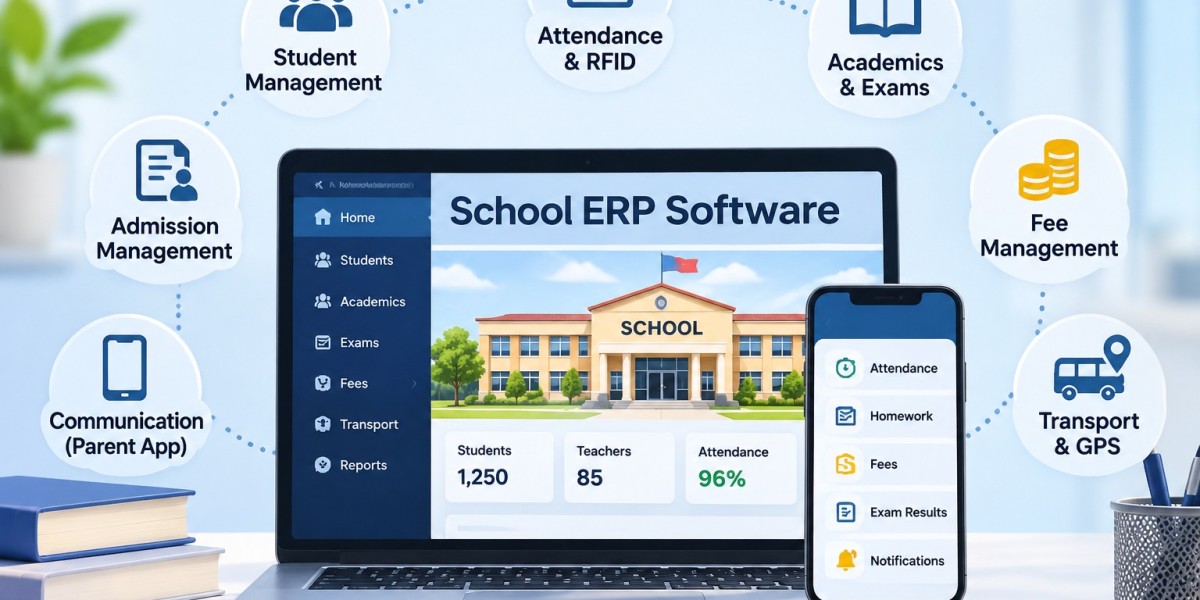
That’s the problem good School ERP Software is built to solve. Below, we’ll look at what’s actually going wrong in most school offices, what an integrated system changes, which features matter, and how to pick a platform you won’t regret two years from now.
The Real Problem Isn’t Paperwork. It’s Disconnection.
Paper isn’t the enemy. The real issue is that every department keeps its own copy of the truth, and none of them talk to each other.
The same student details, typed again and again
A child’s details get written on the admission form. Then entered the student register. Then typed into the fee software. Then added to the class list. Every time someone types them again, there’s a chance of a wrong phone number, a misspelt name or an old address. And when a parent changes their mobile number, who updates it everywhere? Usually, nobody.
Fee follow-ups that eat whole afternoons
Ask any school accountant how long it takes to pull a list of pending dues by class. With manual records, it can take hours. Concessions, instalments and late fees make it even harder. Reports for management get delayed, and parents get reminders they don’t understand.
Parents who hear things late, or not at all
Parents want to know three things: Is my child attending? How are they doing? What do I need to pay or prepare? When updates come through printed notes in school bags, scattered phone calls and crowded WhatsApp groups, messages get missed. Then the phone calls start.
Teachers stuck doing clerical work
Teachers became teachers to teach. Yet a big part of their week goes into registers, mark sheets, homework records and report cards. Every hour spent on that is an hour not spent with students.
So What Does “Integrated” Actually Mean?
Here’s the simple version. In an integrated system, information is entered once and used everywhere it’s needed.
When a new student is admitted, their record goes into one central database. The attendance module, fee module, exam module and parent app all pull from that same record. Nobody re-types anything. When marks are entered, they’re ready for report cards. When fees are paid online, the accounts team sees it right away, and so does the parent.
That’s the core difference between proper School Management Software and a collection of separate apps. It’s not about going digital for the sake of it. It’s about making your departments work as one team.
A well-set-up system should help your school:
Cut down repeated data entry
Keep student and staff records clean and current
Collect fees faster and report on them easily
Keep parents informed without extra phone calls
Give management real numbers to make decisions with
Work smoothly on both desktop and mobile
Features That Are Actually Worth Paying For
Not every school needs every feature. A 400-student school in a small town has different priorities than a 3,000-student CBSE chain. Still, a few modules matter almost everywhere.
Admission and enquiry management
Admissions are a family’s first real experience of your school. If enquiries get lost or forms go missing, that first impression suffers. A good admission module lets you record enquiries, store application details and documents, and track each application’s status in one place. During peak season, this alone can save your front office a lot of stress.
One central student database
Almost every department uses student data. A dependable Student Management Software in India keeps profiles, parent details, class allocation, attendance and academic history in a single record. Need a transfer certificate? A student’s attendance history? A parent’s contact number? It’s a search away, not a hunt through files.
Attendance that doesn’t need re-counting
Attendance can be marked by teachers on a phone or tablet, or captured through biometric devices for staff. Look for daily student attendance, staff attendance, leave management, monthly summaries and automatic alerts to parents. Once attendance is digital, spotting a student who’s missing too many days becomes easy.
Fee management and online payments
This is often the module that pays for the whole system. You’ll want configurable fee structures, instalments, concessions, receipts, outstanding-dues reports and automatic reminders. With online fee payment, parents can pay from their phone instead of taking half a day off to visit the school office.
Exams and report cards
Exam schedules, marks entry, grading, result processing and report cards all in one flow. Teachers enter marks once, and the system handles the rest. Report card week becomes a lot less painful.
Timetable and lesson planning
Timetables change. Teachers go on leave. Subjects get reshuffled. A digital timetable and lesson planning module helps everyone see the latest schedule, and lets coordinators check that lesson plans are on track.
Integrations: Making Your Existing Hardware Useful
Many schools already own biometric machines, ID cards or GPS devices on their buses. The question is whether those devices talk to your management system. Good integrations bring everything onto one dashboard.
Biometric attendance
Staff mark attendance on a supported biometric device, and the data flows straight into the ERP. No manual registers, fewer disputes, and cleaner data for payroll.
RFID-based identification
An RFID School Management System links compatible RFID cards and readers with your school processes. Depending on how it’s set up, RFID can support student identification, attendance workflows, entry monitoring and library management.
A word of caution, though. Buying RFID hardware doesn’t automatically give you full student tracking or security. What you actually get depends on the devices, how they’re integrated and what you need them for. Ask the vendor to walk you through real use cases before you buy.
GPS and school transport
Transport is a constant worry for parents. With GPS integration, schools can manage routes, stops, drivers and student allocation, while parents get bus location updates where the feature is supported. Fewer “Has the bus left yet?” calls for your transport team.
WhatsApp and digital communication
Parents already live on WhatsApp. WhatsApp integration, along with proper communication portals, lets schools send fee reminders, exam schedules, circulars and announcements in an organised way, rather than through messy group chats where important messages get buried.
Why the Mobile App Matters More Than You Think
Teachers check things between periods. Parents check things on the metro. Principals check things at 10 pm. If your system only works well on a desktop in the school office, half its value is lost.
The Best School Mobile App in India shouldn’t just show a few basic screens. It should give each type of user what they need, quickly.
For parents
Depending on what the school turns on, parents can check attendance, view results, read circulars, see homework, check fee dues, pay online and get transport updates. Every one of those is a phone call your office no longer has to take.
For teachers
Teachers can mark attendance, look up student details, review lesson plans and post homework or updates from their phone. Small time savings, many times a day, add up.
For administrators
Management gets a quick view of what’s happening across departments: fee collection, attendance trends and key alerts, without waiting for someone to prepare a report.
Separate logins for parents, students, teachers and admins also mean each person sees only what’s relevant to them.
Connecting Academics with Administration
Plenty of schools start with fees and attendance. That’s sensible. But the real gains come when academics join in too.
A complete Education ERP Software links lesson plans, timetables, homework, exams and performance records with the administrative side. Think about a student who moves to a new section mid-year. Their records, class allocation, timetable and teacher access all need updating. When everything is connected, that’s one change, not five.
It also helps you notice problems early. When attendance, assignment completion and test scores sit in the same place, it’s much easier to spot a child who is quietly falling behind.
To be clear, none of this replaces teachers or real conversations with parents. It simply clears away admin clutter so educators can spend more time where it counts.
How to Choose the Right School Management Software in India
A product demo always looks good. The real test is whether the software fits how your school actually runs. Before you compare vendors, take an honest look at your own processes.
Start with your biggest headaches
Ask yourself:
Are admissions still being tracked in spreadsheets?
Is attendance marked on paper and then typed up again?
Does the accounts team struggle to list pending fees?
Do parents keep calling teachers for routine updates?
Does result preparation take days?
Is it hard to keep parents informed about transport?
Whichever questions got a “yes,” those modules should be your priority.
Don’t be dazzled by a long feature list
A vendor offering 60 modules isn’t automatically better than one offering 30. What matters is whether the modules you need work well for your school.
Test the mobile app properly
Download it. Log in as a parent. Log in as a teacher. Check notifications, fee details and academic updates. If it’s confusing for you, it will be confusing for parents.
Ask hard questions about data security
You’ll be storing sensitive information about children, families and staff. Ask about user permissions, access controls, backups and how data is protected. A class teacher shouldn’t be able to see payroll records.
Think about where your school will be in five years
You might only need admissions, attendance and fees today. Later, you may add a second branch, a hostel or transport. Choose a platform that can grow with you without making things complicated.
Check implementation and support
Software is only as good as its setup. Ask how your existing data will be moved over, how staff will be trained and what support you’ll get after go-live. This matters a lot when comparing different School Management Software in India providers.
Common Mistakes Schools Make (and How to Avoid Them)
Choosing purely on price. Budgets matter, especially for smaller schools. But the cheapest option often costs more later through poor support, missing features or a painful switch. Compare value, not just the quote.
Skipping staff training. If teachers and office staff don’t feel confident, they’ll quietly go back to registers and Excel. Plan hands-on training for each department.
Switching everything on at once. Too much change in one go confuses everyone. Start with the essentials, such as student records, admissions, attendance and fees, then add more once people are comfortable.
Ignoring the parent and teacher experience. A system that admins love but parents find confusing won’t get used. Test it from every user’s point of view.
Migrating messy data. Moving wrong or duplicate records into a new system just moves the problem. Clean up student, staff and fee data before you migrate.
Where One Flawless Fits In
One Flawless India builds a school platform that brings academics, administration, finance and communication together, so schools don’t have to juggle separate tools.
Administration: Modules cover admissions, student management, staff management, finance, examinations and general administration, giving management one place to see how each department is doing.
Academics and exams: Lesson planning, timetables, examinations, assignments and academic reports help teachers and coordinators stay organised.
Fees and finance: Fee management, financial accounting and payroll features help schools keep money matters accurate and easy to report on.
Mobile app: The One Flawless app gives access to administrators, students, parents and transport in-charges, with notifications, attendance updates, homework, assignments, exam results, online fee payments, transport updates, an e-diary and circulars.
Integrations: One Flawless supports biometric systems, RFID, WhatsApp, online payments, GPS tracking, POS and barcode systems and school website integration. The exact setup depends on your current infrastructure, so it’s worth discussing your specific needs with their team.
If you’re shortlisting the Best School ERP Software for your institution, One Flawless is worth a closer look, especially if you want academics, admin and parent communication under one roof.
What’s Next for School Management in India
Digital transformation in schools isn’t only about smart boards and online classes. The systems running behind the scenes matter just as much. A well-implemented School ERP & LMS Software brings administration and learning closer together. A few trends stand out:
Cloud-based platforms let authorised users access data from anywhere, on any supported device. Just make sure you understand hosting, backups and data protection.
All-in-one parent apps are becoming the norm. Parents don’t want five apps for one child.
Better use of school data. Live dashboards on fees, attendance and performance are replacing manually prepared monthly summaries.
Sensible automation. Reports, reminders and record updates can run on their own. The aim is to remove repetitive work, not add complexity.
Smart identification. Biometric and RFID tools will keep growing as schools look for systems that work with the hardware they already own.
The Bottom Line
Running a school today takes coordination, transparency and quick access to accurate information. When admissions, attendance, fees, exams and parent communication sit in separate systems, your team ends up managing the systems instead of the school.
An integrated platform changes that. But don’t choose based on feature count alone. Look at ease of use, implementation support, integrations, the mobile experience and whether the system can grow with you.
If you’re evaluating the Best School ERP Software in India, One Flawless India deserves a spot on your shortlist for its mix of academic management, administration, finance, mobile access and integrations.
See It in Action Before You Decide
The easiest way to know if a platform fits your school is to see it working with your own workflows in mind. Book a free demo with One Flawless India and get your questions answered by their team.
Website: https://oneflawless.com/
Email: [email protected]
Call: +91 73036 23733